Creating a standard operating procedure (SOP) that people actually use takes four stages: plan what needs documenting, write it clearly, review it with the people who will use it, and roll it out so it becomes habit. Get those right, and "everyone wings it" workflows turn into steps anyone can follow.
Why Your Business Needs SOPs (Even If You Don't Know It Yet)
Does this sound familiar? You spend an hour walking a new hire through a task, and a week later they ask the same questions. Or your go-to person for a critical process goes on vacation, and everything stalls because nobody else knows how it works.
Both are signs your business runs on tribal knowledge: know-how that lives in a few people's heads. That means inconsistent results, wasted time and a steady stream of fires to put out.
The True Cost of "Everyone Does It Their Own Way"
When every employee has their own method for the same task, the results are unpredictable. One person's idea of an "invoiced" client can differ from a coworker's, and the confusion turns into costly errors. Standardizing the method is how every task gets done to the same standard, every time.
Mapping the process out is the first step. Once the workflow is on paper, the bottlenecks and redundant steps show up, and you can fix them before you write the SOP. Our guide to documenting business processes covers that mapping in more detail.
From Corporate Buzzword to a Tool for Growth
"SOPs" can sound like stuffy corporate jargon, but they're one of the most useful tools you have for scaling a business. Documented processes make it far easier to train new people, delegate without micromanaging, and keep quality steady as the team grows.
Writing them has a side benefit, too: the team has to agree on one best way to do each task, which settles arguments that would otherwise drag on for months.
The Four Core Stages of Creating an SOP
| Stage | Key objective | What you'll actually do |
|---|---|---|
| Plan | Define the goal and scope of the SOP. | Pick a painful process to fix, decide who the guide is for, and gather the information you need. |
| Write | Create a clear, easy-to-follow document. | Draft step-by-step instructions in plain language, with screenshots and checklists. |
| Review | Get feedback from the people who will use it. | Share the draft, test it on a real task, and fix what people trip over. |
| Implement | Make the SOP part of daily work. | Release the final version, train the team, and set up a schedule for keeping it current. |
Laying the Groundwork: The Prep Work That Makes SOPs Stick
If you start writing without a plan, you'll end up with a confusing document nobody opens. A little prep work first makes sure the writing pays off.
Start with the processes causing the most headaches. Don't try to document everything at once. Focus on the tasks that generate the most repeat questions, lead to constant mistakes, or are critical to daily operations.
Find the Pain, Then Define Your Scope
The quickest way to find priorities is to ask your team: "What's one task you wish you had a clear guide for?" The answers point straight at the workflows that need an SOP most.
Once you've picked a process, define its scope. Where does it start, and where does it end? Instead of a vague "Onboard New Client" SOP, get specific: "How to Set Up a New Client in Asana." A tight scope keeps the document from sprawling into a novel.
Choose a Format That Fits the Task
SOPs don't have to be long walls of text. The right format depends on how complex the task is and how your team likes to learn:
- Simple checklist: For routine, linear tasks, like an end-of-day closing procedure or publishing a blog post.
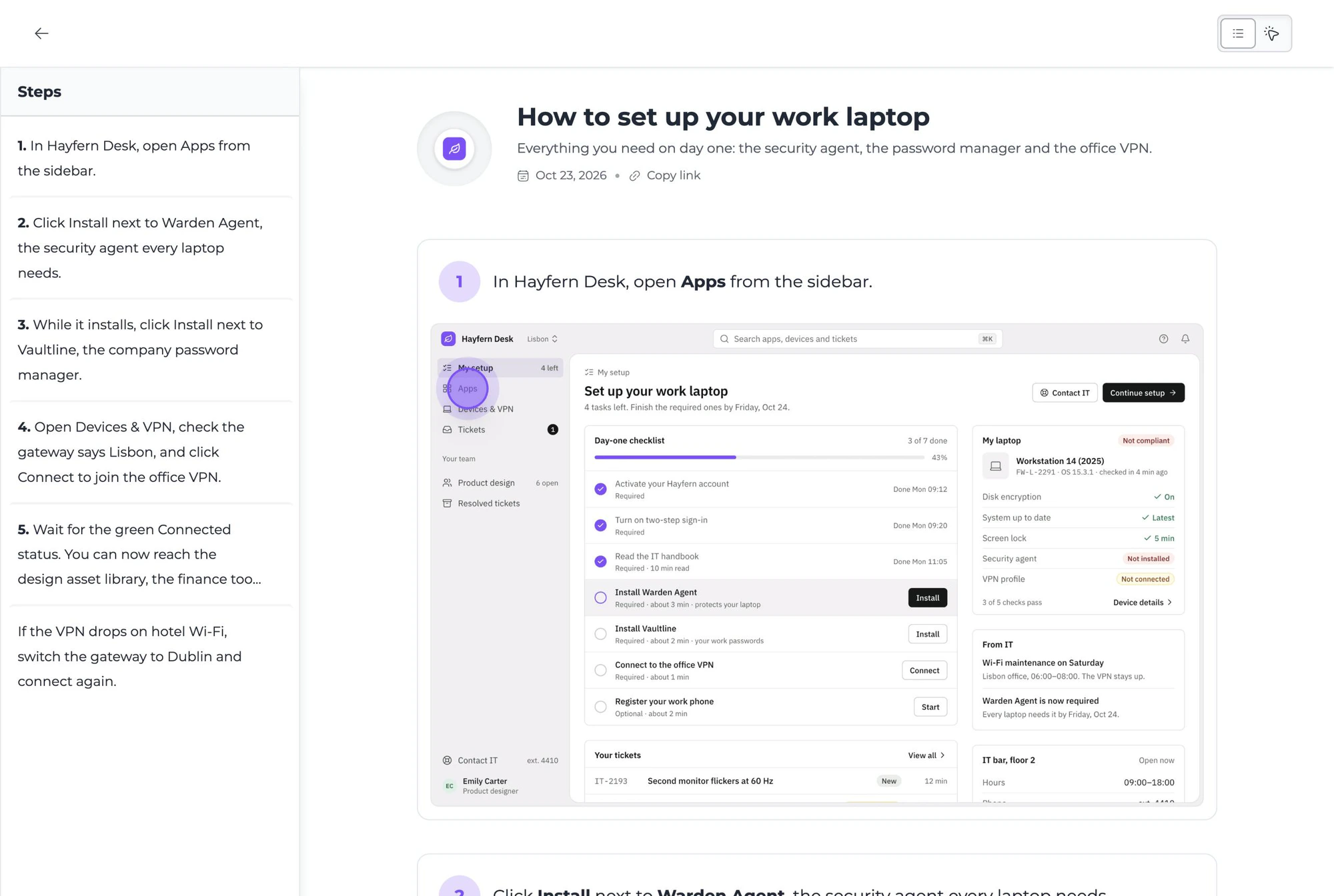
- Step-by-step guide: For involved processes that need detailed instructions and screenshots. This is the default for most software tasks, like processing a refund in Stripe.
- Video walkthrough: For hands-on, visual tasks that are hard to explain in words, like assembling equipment or navigating a tricky interface.
If you're not sure where to begin, browse these SOP examples to see how other teams lay theirs out. Picking the right format up front makes it far more likely your team will use what you write.
Writing SOPs People Actually Want to Use
Most SOPs are dense with corporate-speak and hard to follow. The goal is a document so clear that people would rather open it than interrupt a coworker.
That comes down to writing like a person. Drop the jargon, use simple words, and write in the active voice. Instead of "The client's details are to be entered by the account manager," write "The account manager enters the client's details."
Speak Your Team's Language
Write for your audience. An SOP for the engineering team can use the technical terms they use every day. An SOP for a company-wide process should drop any terminology that would confuse someone from another department.
A marketing SOP might say, "Update the CTR in the CRM." A clearer version says, "Update the click-through rate (CTR) in HubSpot, our customer platform." That small change helps everyone, especially new hires still learning the acronyms. If someone has to ask what a word means, the SOP has already failed them.
Start Every Step With a Verb
Begin each step with the action the reader takes. "The user should make sure the file is opened" becomes "Open the project file." Steps written as commands are shorter, easier to scan and leave no doubt about who does what:
- Enter the customer ID in the search field.
- Click "Save changes" in the top-right corner.
- Check that the shipping address matches the invoice.
- Attach the signed PDF to the email.
Keep it to one action per step. "Find the client's invoice, download it as a PDF, rename it and upload it to the shared drive" is four steps pretending to be one, and the reader will miss at least one of them. Split it:
- Open the Invoices tab and find the client's record.
- Click the download icon and choose "Save as PDF".
- Rename the file
ClientName_Invoice#_Date.pdf. - Upload it to the Client Invoices folder.
When something goes wrong, single-action steps also make it obvious where the process broke.
Make It Visual and Action-Oriented
Nobody wants to read a wall of text in the middle of a task. A well-placed screenshot with an arrow pointing at the exact button is worth a paragraph of description.
Ways to break a process down visually:
- Annotated screenshots: Add arrows, boxes or short callouts to show exactly what you mean on screen.
- Short video clips or GIFs: For a quick multi-step action on one screen, a short loop shows the flow.
- Simple flowcharts: When a process has a decision point ("If the client is new, do X; if not, do Y"), a basic flowchart makes the logic obvious.
Mixing clear text with visuals suits different learning styles and cuts the chance that someone misreads a step.
Structure for Clarity and Consistency
A consistent structure makes SOPs predictable and easy to scan. When every document follows the same format, your team knows where to look, whether they're onboarding a client or ordering office supplies.
Essential Components of a User-Friendly SOP
| Component | Purpose | Example |
|---|---|---|
| Clear title | Tells the reader what problem this solves. | "How to Issue a Client Refund in Stripe" |
| Purpose statement | One sentence on why this matters. | "This SOP makes sure every refund is processed the same way and tracked for accounting." |
| Scope | Where the process starts and ends. | "Starts after a refund is approved and ends when the customer is notified." |
| Actionable steps | The core of the SOP: a numbered list that starts each step with a verb. | "1. Log in to the Stripe dashboard. 2. Search for the customer's original payment." |
| Visual aids | Screenshots, GIFs or diagrams that clarify tricky steps. | A screenshot of the Stripe search bar with the customer's name highlighted |
| Ownership | Who keeps the SOP up to date. | "Owner: Head of Customer Success" |
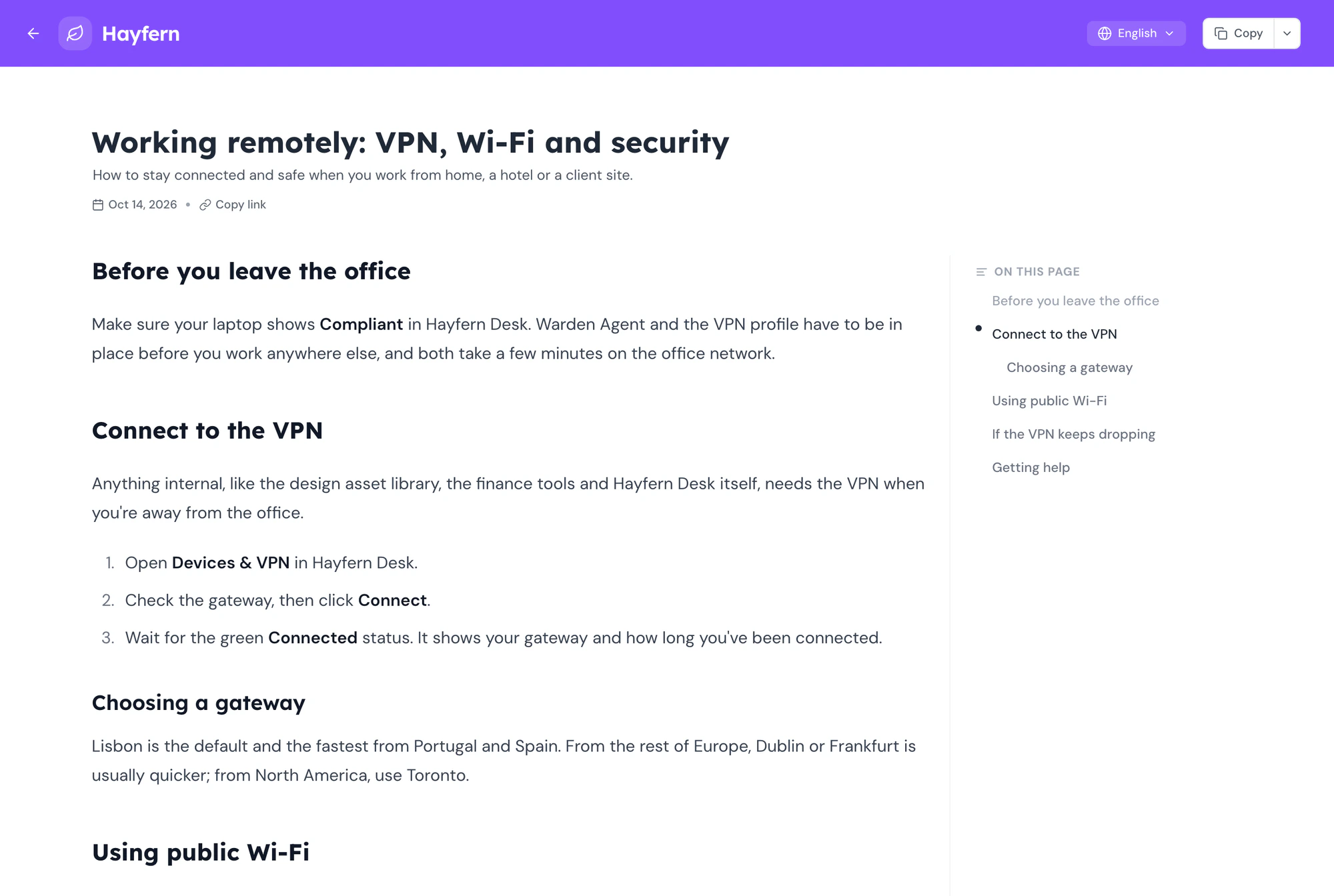
Here is how those parts look on a real SOP:
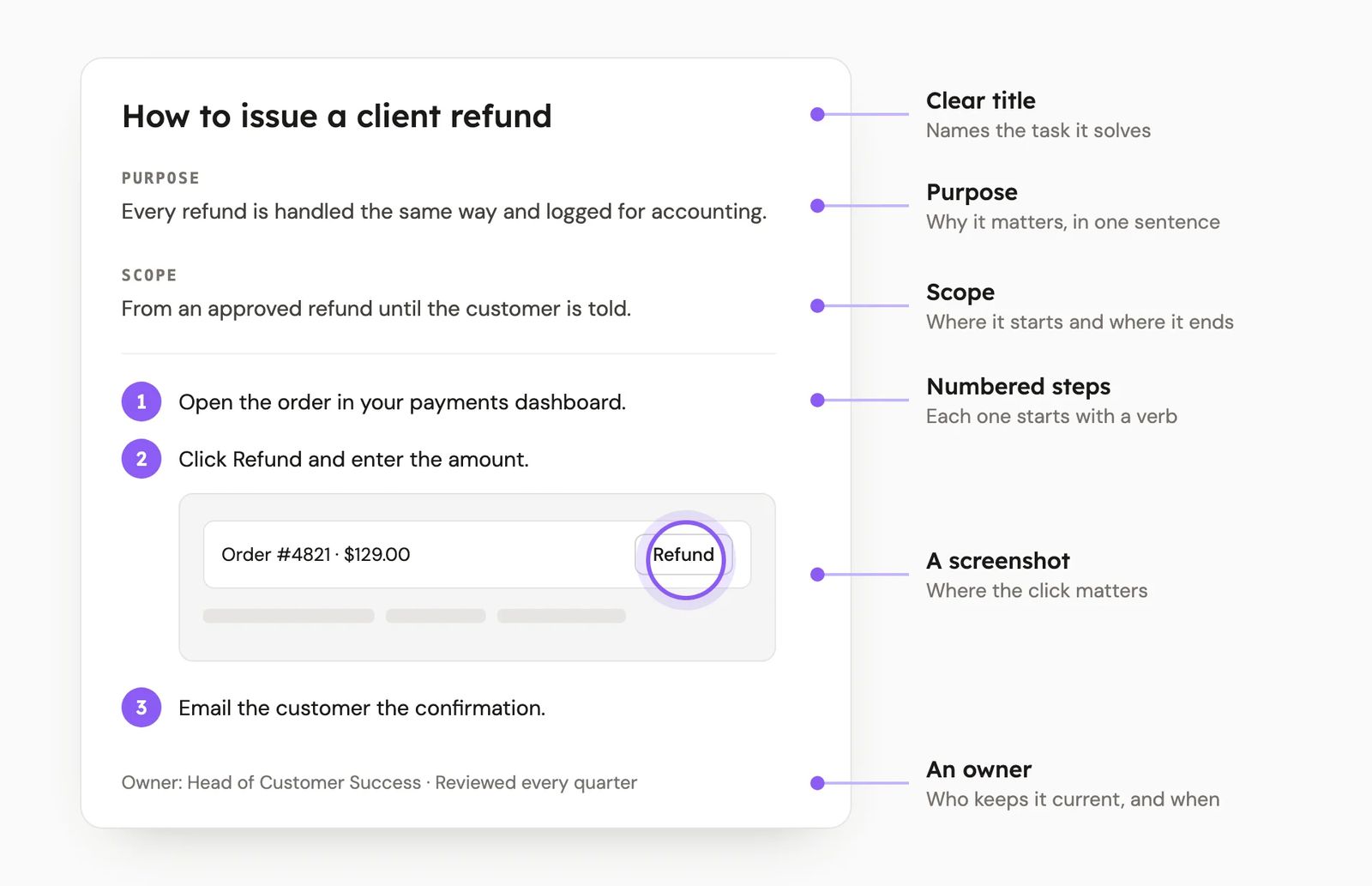
Include these every time and you build a library that is easy to follow and simple to maintain. For a more detailed layout, see our standard operating procedure template.
Test It on Someone Who Has Never Done the Task
Your first draft is your best guess. You know the process so well that you fill in gaps without noticing, and an expert reviewer will do the same. The only reliable check is to watch someone new follow it.
Hand the SOP to a new hire or a colleague from another team, ask them to do the task using only the document, and stay quiet. You're not there to help them finish; you're there to see where the document lets them down. Watch for:
- Pauses: Where do they stop and reread? That sentence isn't clear yet.
- Questions: Anything they have to ask about is missing from the SOP, often a prerequisite like a login they needed before step one.
- Wrong clicks: The order of steps or the screenshot doesn't match what they see.
- Shortcuts: Sometimes a fresh pair of eyes finds a faster way you've overlooked for years.
Fix what you saw, then finish the paperwork: get sign-off from the process owner, and add a version line such as "v1.1, step 5 updated with the new screen, March 2026" so nobody follows an old copy.
Choosing the Right Tools to Manage Your SOPs
A well-written SOP is useless if your team can't find it. Word docs buried in shared-drive folders turn into a document graveyard. SOPs need a home where they're easy to find, update and manage.
You don't have to start with an expensive platform. Familiar tools work well at the start.
Simple and Accessible Options
For smaller teams, the best tool is often one you already use:
- Google Docs: Collaborative, searchable and free. Create a shared folder, agree on a naming convention (for example, "HR - How to Onboard New Hire"), and you're set.
- Notion: A step up. You can build a simple company wiki with nested pages, tags for filtering, and videos or diagrams embedded in your SOPs.
Either way, the goal is a single source of truth. Everyone needs to know where the current version of each procedure lives, so nobody has to ask, "Is this the latest version?"
Dedicated SOP and Knowledge Base Software
As the company grows, so does the complexity of its operations, and dedicated software starts to pay for itself. Look for:
- Version control: Tracks every change, so you can see who updated what and when, and roll back if needed.
- Fast search: Team members should find the exact step they need in seconds.
- Integrations: Connections to tools you already use, like Slack or Asana, so people hear about important updates.
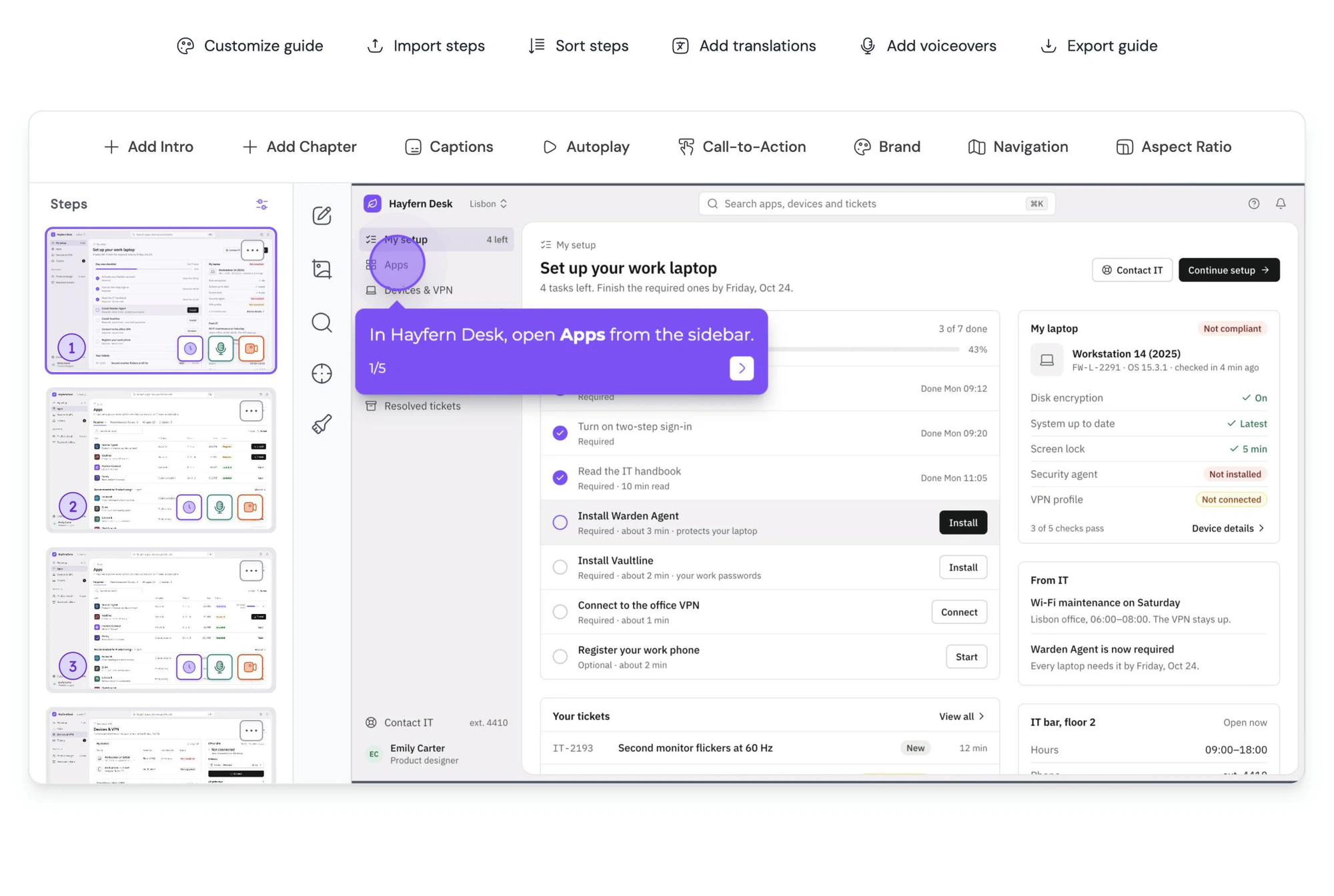
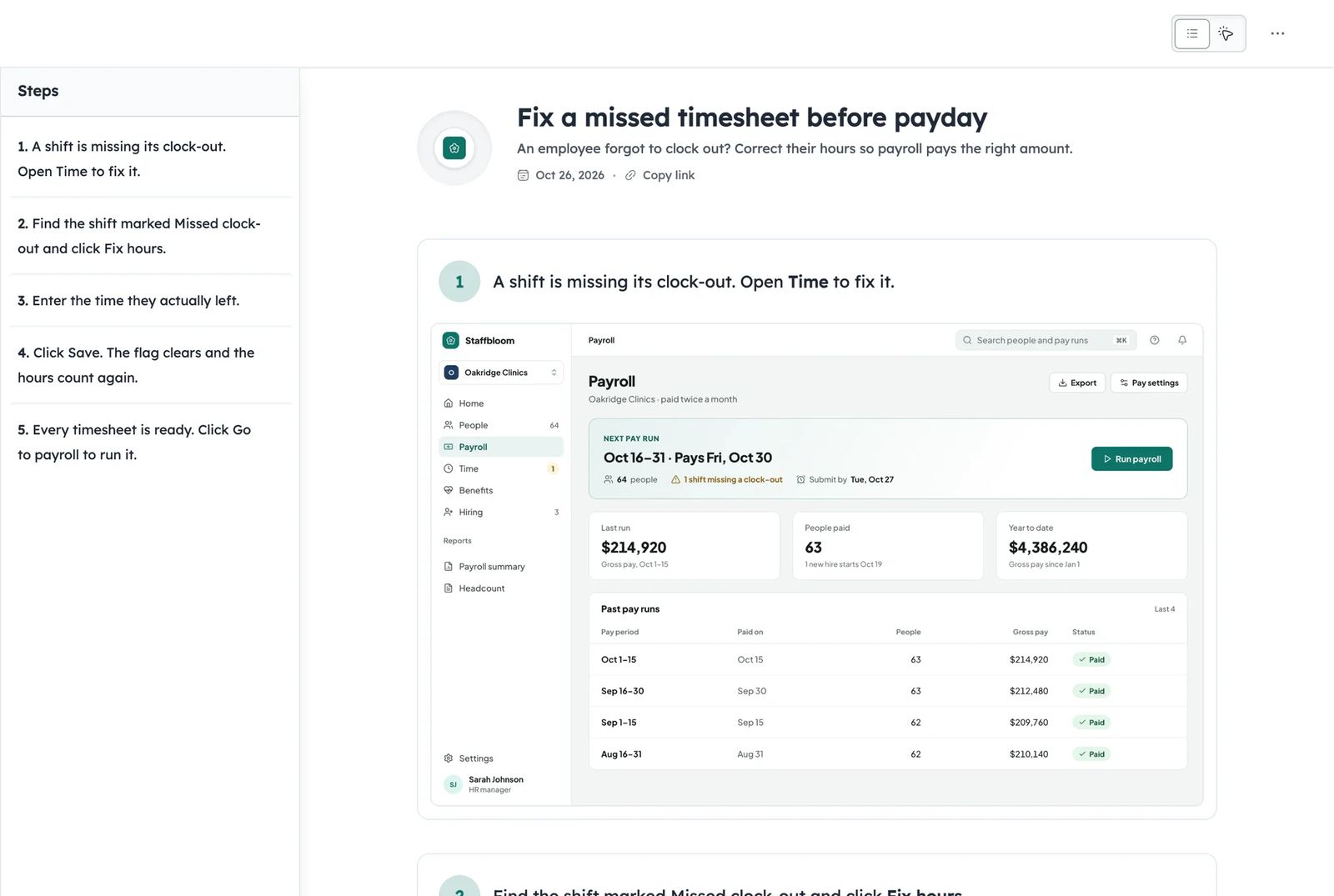
Tools like Guidejar go a step further: you do the task once, and it becomes a visual step-by-step guide with screenshots, which is far easier to follow than a wall of text. Your team finds every SOP in one searchable place, and when a tool changes, you update the guide in minutes instead of rewriting a document. See how teams run their SOPs and internal docs in Guidejar, or compare options in our roundup of SOP software for small businesses.
Getting Your Team On Board: How to Make SOPs a Habit
A perfect SOP that sits unused in a shared drive helps nobody. The hard part is making it part of the team's daily work, and that takes training, feedback and a plan to keep it current. The aim is to make people's work easier, not to hand down rules.
Make Training a Workshop, Not a Lecture
An email with a link and the subject line "Required Reading" is the fastest way to make sure nobody reads the SOP. Sell the why instead.
Get the team together for a short hands-on session. Don't read the document aloud. Walk through the process step by step and explain the problem it solves: maybe it cuts repetitive data entry or prevents a common error. When people see how it helps them, they adopt it.
Treat the session as a conversation. Ask, "Does this feel clunky to anyone?" or "Will this step hold up when things get busy?" People who helped shape the process take ownership of it, so it becomes "our new way of doing things" instead of a mandate from above.
Build a Feedback Loop That Works
Your first draft won't be perfect. The people using the SOP every day will find the gaps, the confusing words and the awkward steps you missed, so make it easy for them to tell you:
- Create a go-to spot: A Slack channel (
#sop-feedback), a simple Google Form, or a tag in your project management tool. Submitting a suggestion should take seconds. - Acknowledge every idea: You don't have to act on every suggestion, but reply to each one. "Thanks, we'll look into it" shows you're listening.
- Give credit: When someone's idea improves a process, call it out in a team meeting or on Slack.
Keep Your SOPs From Going Stale
Tools change, new people bring better ideas, and processes improve. An outdated SOP is worse than none, because it teaches people not to trust the rest of the library.
Schedule regular reviews. For most processes, a quarterly check is enough: put a recurring event on the process owner's calendar to read the document and confirm it's still accurate. Don't wait for the calendar when something changes, though: update the SOP as soon as a tool in the process gets a new screen, the process itself changes, or someone reports a confusing step.
Frequently asked questions
- Which process needs an SOP first?
Start with the process that causes the most pain. Look for the questions your team asks each other most often and the tasks that keep leading to mistakes or rework. A frequent, critical process that confuses people is the best first SOP, because fixing it pays off right away.
- What is the difference between a process and an SOP?
A process is the big picture, such as "onboard a new client": it names the outcome but not the exact route. An SOP is the turn-by-turn directions for that process, such as "1. Send the welcome email using Template X. 2. Create the client folder in Google Drive." It makes sure everyone does the work the same way.
- What is the difference between a policy and a procedure?
A policy is the rule and the reason for it, such as "All employees lock their computers when they leave their desks." A procedure is the how-to that puts the policy into practice, such as "How to lock your workstation." A work instruction goes one level deeper and covers a single step in detail. Keep them in separate documents so each stays short and easy to follow.
- How do I get my team to actually follow SOPs?
Involve the team in writing them, so the SOPs feel like their process rather than rules handed down. Then make them easy to find: keep every SOP in one searchable place, because if finding a document is harder than asking a coworker, people will ask the coworker.
- How much detail should an SOP include?
It depends on who reads it. A new hire, or a task with safety or compliance risk, needs every click and check spelled out. An experienced team only needs a short reference to stay consistent. When in doubt, add detail, then test the SOP on someone from the target audience and cut what they didn't need.
- Filed under
- Documentation & SOPs