Guidejar vs Scribe in 30 seconds
Scribe (formerly ScribeHow) earned its reputation: point it at a browser workflow and a clean, screenshot-based SOP comes out the other side. For internal process documentation and knowledge-base guides, it works well.
The catch in 2026 is where the good parts live. Translation, the MCP server, enforced PII redaction, and SSO are all Enterprise-only, and translation and MCP only on select Enterprise modules, so even an Enterprise contract may not include them. Every export format sits behind Pro. There’s no hosted, branded help center to publish SOPs to.
Guidejar captures the same SOPs and ships those capabilities on $19–$75 plans you can buy with a card, starting at $19/seat versus Scribe’s $35. The full feature table and pricing math are below — and where Scribe is genuinely the better pick, we say so.
Four reasons SOP teams pick Guidejar over Scribe
Both tools turn a captured workflow into a step-by-step guide. Guidejar does that job for less, and without waiting on an Enterprise contract.
Price
Same SOP job, $16 less per seat every month
Guidejar Pro starts at $19/seat/month ($16 billed yearly). Scribe’s cheapest paid entry is Pro Personal at $35/seat/month ($25 billed yearly). For a team that just needs capture, exports, and day-to-day SOP sharing, that’s the clearest gap. The features Scribe parks behind Enterprise (translation, MCP, SSO) all land on Guidejar’s $19–$75 plans.
Translation
Translate one capture into 30+ languages — from Pro
Global SOP and training teams shouldn’t need an Enterprise module to ship a French or Japanese guide. One capture translates into every language your audience needs (French, German, Japanese, Brazilian Portuguese and 27 more) on every paid Guidejar plan. Scribe translates into 14 languages, but only for Enterprise customers on select modules, and translated guides can still only be edited in the English source.
See AI translationHelp center
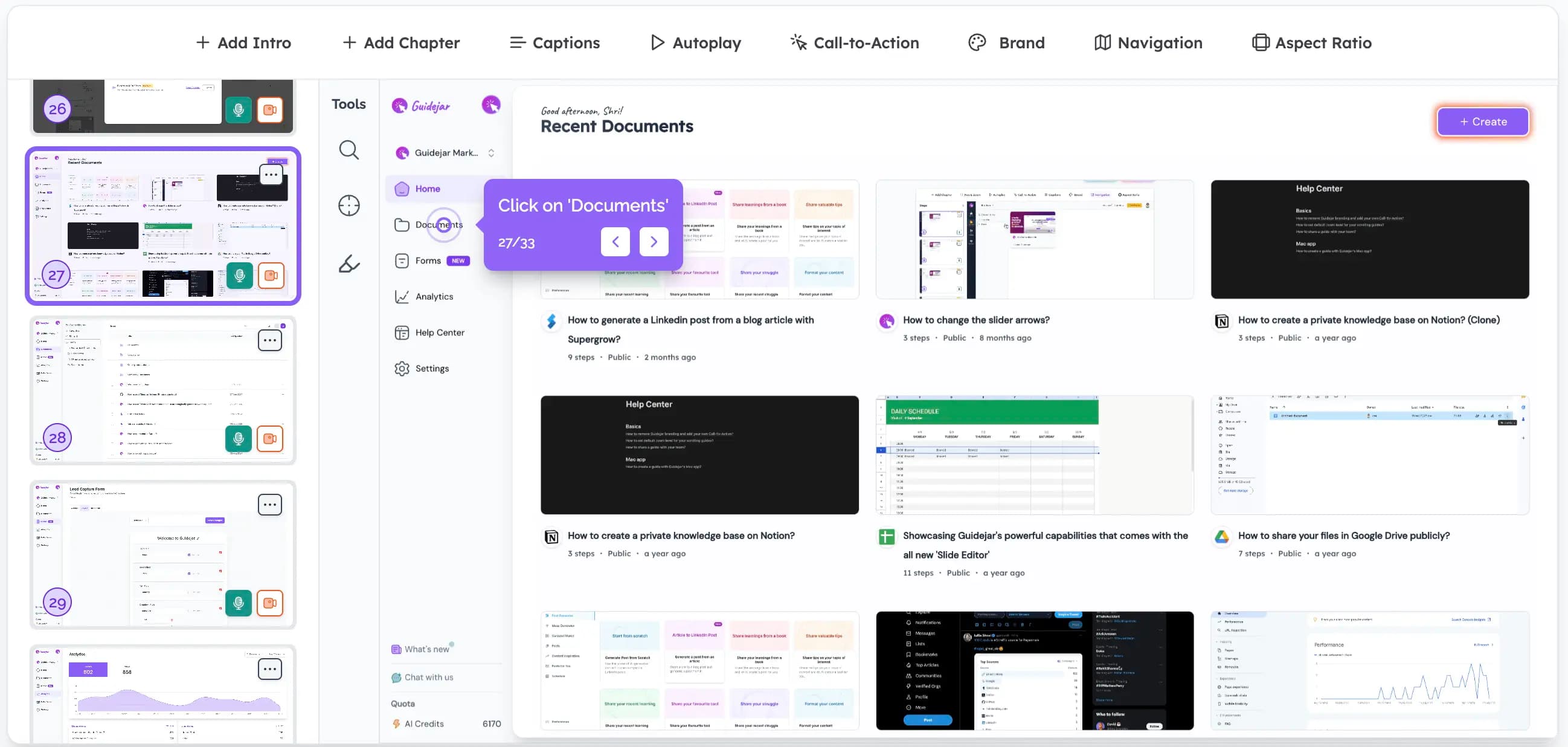
Publish SOPs where people can actually find them
A searchable, branded help center at help.yourcompany.com turns one-off SOPs into a knowledge base teammates and customers can reach. Scribe doesn’t offer one at any tier. Its model is the opposite: embed guides into a wiki or help desk you already pay for, like Zendesk, SharePoint, or Confluence. That works if you already run one — and means another bill if you don’t.
Explore the help centerWalkthrough & video
An SOP doesn’t have to be a 40-screenshot wall
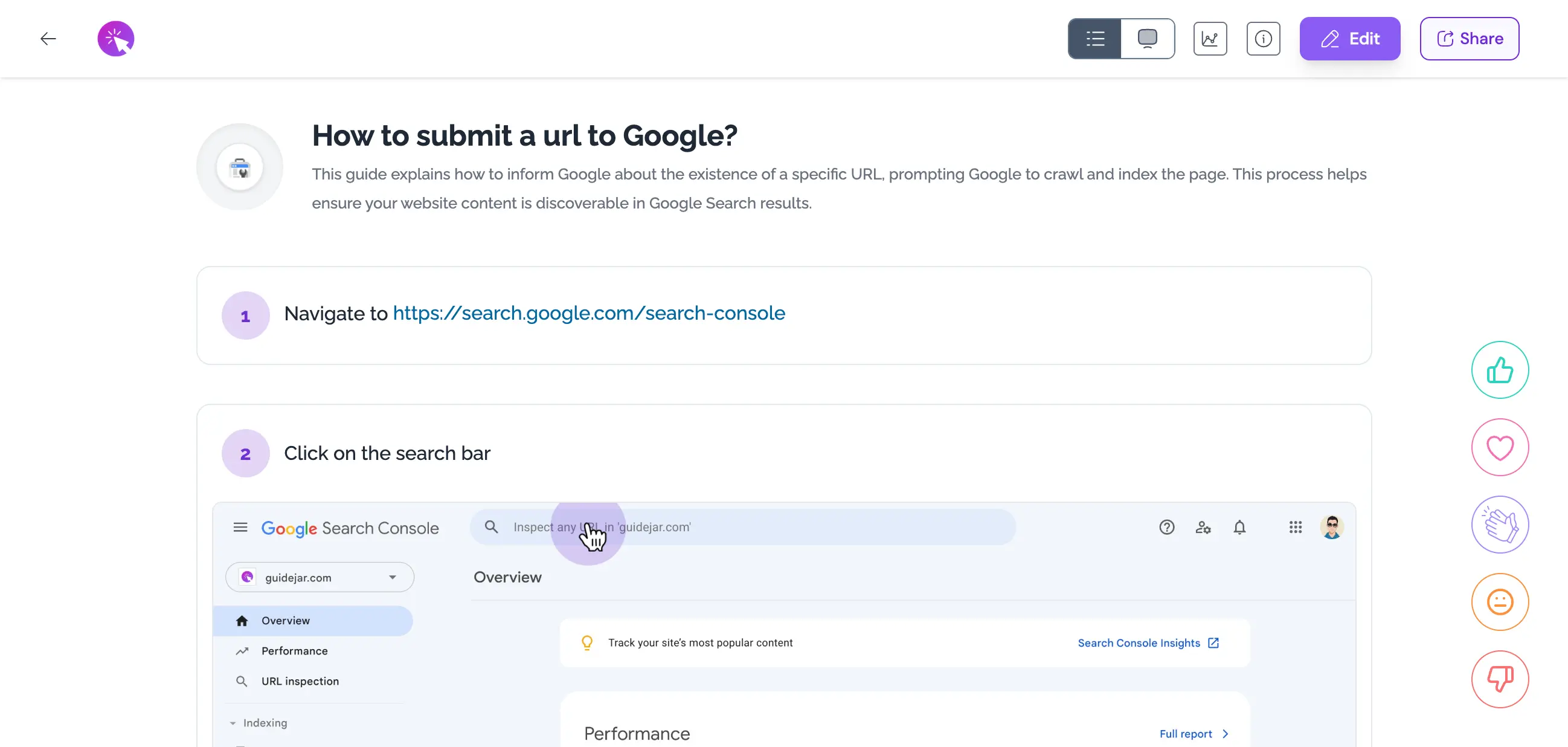
The same capture also publishes as an interactive walkthrough people click through, which lands better for training and onboarding, and exports to MP4 for anyone who’d rather watch, with an AI voiceover you pick (or clone from your own voice). Scribe’s Movies play from a shared link or an embed with auto narration. There’s no downloadable video file on any plan, and nothing in its docs describes choosing or generating an AI voice.
How AI voiceover works
Feature-by-feature comparison
Side by side on the SOP job — capture, written output, exports, publishing, and price. Interactive walkthrough and video sit in the output rows for teams that want them.
| Capability | Guidejar | Scribe |
|---|---|---|
| Capture | ||
| Browser capture | Yes — free plan | Yes — free plan |
| Desktop capture | Plus plan | Pro plan |
| Manual blur & redaction | Yes — free plan | Pro plan |
| Assisted / automatic redaction | Auto-Redact PII (Business) | Smart Blur (Pro), enforced PII/PHI (Enterprise) |
| Content & output | ||
| Written SOP output | Included | Included |
| Configurable AI voiceover | Yes — Pro plan | No — auto narration only |
| AI voice cloning | Business plan | Not available |
| Multi-language translation | Translate into 30+ languages, Pro plan | Translate into 14, Enterprise only |
| Downloadable video / MP4 export | Plus plan | No — link & embed playback |
| Import PDFs & Word docs | Pro plan, no cap | Pro plan, 20 imports all-time per team |
| Video-to-guide import | Plus plan, no cap | Pro plan, shares the 20-import cap |
| Interactive branching | Yes — Pro plan | Not available |
| Multi-guide document | Yes (Articles) | Yes (Pages) |
| Exports | ||
| PDF export | Yes — free plan | Pro plan |
| HTML export | Pro plan | Pro plan |
| Markdown export | Pro plan | Pro plan |
| Publishing & AI | ||
| Hosted branded help center | Plus plan | No — embeds into your existing tools |
| Custom domain | Plus plan | Enterprise URL whitelabeling only |
| MCP server (AI integration) | Full read + write, Plus ($25) | Enterprise only, select modules |
| Confluence integration | Can be done with Insta Copy | Yes — native integration |
| SAML SSO | Business and Enterprise plans | Enterprise only |
| Pricing | ||
| Free plan | 5 guides | Guide-capped, no exports |
| Starting paid price (monthly) | $19/seat — Pro | $35/seat — Pro Personal |
| Starting paid price (billed yearly) | $16/seat — Pro | $25/seat — Pro Personal |
| Team plan (monthly) | $75, +$15/seat — starts at 5 seats | $85, +$17/seat — starts at 5 seats |
| Enterprise | Custom | Custom |
For the everyday SOP job, capture is a tie, and Scribe wins on redaction depth. The value gap is what tier things live on, and what you pay to get them. Translation, the MCP server, enforced PII/PHI redaction, and SSO are all Enterprise-only at Scribe, with translation and MCP limited to select Enterprise modules on top of that. Guidejar ships the same capabilities on plans between $19 and $75 that you can buy with a card, starts $16/seat cheaper on monthly Pro vs Pro Personal, and adds a hosted branded help center plus PDF export on the free plan. Interactive walkthrough and MP4 export are there when a screenshot wall isn’t enough.
Verified against Scribe’s published plan-comparison matrix and support documentation, July 2026. Spot something out of date? Tell us and we’ll correct it.
Pricing compared
Same team, smaller bill. You don’t give up the features you’ll actually use.
$240less/year
for a 10-person team, both billed monthly
$19/seat
Guidejar Pro monthly vs Scribe Pro Personal at $35/seat
30+languages
Guidejar translates into these from Pro vs Enterprise-only at Scribe
Bottom line: Billed monthly, a 10-person team on Scribe Pro Team pays $170/month. The same team on Guidejar Business pays $150/month — $240 less per year. Billed annually the gap narrows to $130/month vs $119/month, or $132 a year. Either way the bigger number is the tier gap: translation, MCP, enforced redaction, and SSO cost an Enterprise contract at Scribe.
Prices as of July 2026. Scribe Pro Team starts at 5 seats; Guidejar Business bundles 5. See full Guidejar pricing →
Where Scribe genuinely wins
No tool is best at everything. Here’s where Scribe is the more sensible pick.
Enforced auto-redaction with a HIPAA posture
Smart Blur assists redaction during capture on Pro, and Enterprise escalates to enforced, customisable automatic redaction of PII and PHI plus a Smart Privacy Screen, under a HIPAA and GDPR compliance posture. For a healthcare, finance, or legal team that needs redaction applied by policy rather than by whoever is recording, that is a real advantage over Guidejar’s per-guide Auto-Redact PII on Business.
43 integrations and a real Confluence connector
Scribe lists 43 integrations, including SharePoint, Zendesk, Salesforce Knowledge, Slack, Teams, and a long list of LMSs, plus a genuine Confluence push connector on Pro and Copilot, a Slack bot, and a search API on Enterprise. Guidejar’s equivalents are Insta Copy paste, not native OAuth connectors. If your docs have to land inside those systems, Scribe’s ecosystem is broader today. (One gap on both sides: Scribe has no native Notion integration either.)
Which tool is right for your team?
Honest recommendations based on how your team writes and shares SOPs.
Choose Guidejar if
- You want the same screenshot SOPs without paying Scribe’s Enterprise gate for translation, MCP, or redaction
- You need to translate SOPs into 30+ languages starting on the Pro plan
- You want SOPs published somewhere teammates and customers can reach, on your own domain
- You care about free-plan PDF export, manual redaction on free, and imports with no all-time cap
- You want the option to present the same SOP as a clickable walkthrough or MP4 when a screenshot wall isn’t enough
- You’d rather build some guides by hand from screenshots you already have than record every one from scratch
- You want an AI agent to build your SOP library from existing docs, and the team to self-serve answers from ChatGPT or Claude, on a $25 plan rather than Scribe’s Enterprise-only MCP
Choose Scribe if
- You need PII and PHI redaction enforced by policy, under a HIPAA posture, on an internal-only SOP library
- Your docs must land natively in Confluence, SharePoint, Zendesk, or Copilot
- You need approval and verification workflows with SCIM, RBAC, and multi-team governance
- Your team writes dense, long-form SOPs at volume inside an existing wiki stack, and capture speed is the whole job
Most teams should pick Guidejar.
It does the same SOP and knowledge-base job Scribe is known for, at better value: $19/seat vs $35, more languages without an Enterprise module, and a place to publish that customers can reach. When a 40-screenshot wall isn’t enough, the same capture also publishes as an interactive walkthrough and exports to MP4. Choose Scribe when enforced PII/PHI redaction, native enterprise connectors, or governance workflows are hard requirements and the Enterprise budget is there.
Switching from Scribe to Guidejar
You don’t have to start over. Most teams finish the move in under a week.
- 1
Export what you have
Scribe exports PDF, Word, HTML and Markdown on Pro. The free Basic plan has no exports at all, so anything sitting there needs re-capturing.
- 2
Import into Guidejar
Turn those PDFs or Markdown docs into guides in just a few clicks, with no all-time import cap. Anything else re-captures with our extension in a couple of minutes.
- 3
Publish it properly
Choose Scroll View or Walkthrough View or both per guide, add AI voiceover, translate into 30+ languages, and put the whole library on a branded help center at your own domain.
Trusted by teams worldwide









“Guidejar does everything Scribe could do and more, and the Enterprise pricing isn’t even close.”
David Martin, IT Specialist at Nakupuna Companies
Frequently asked questions
The questions people actually search before picking one of the two.
Something else on your mind? Talk to us
For most teams that need SOPs and a knowledge base — yes. Guidejar covers the same capture-to-guide job at $19/seat vs Scribe’s $35, translates into 30+ languages on every paid plan, and includes a branded help center. At Scribe, translation, the MCP server, enforced redaction, and SSO are Enterprise-only. Scribe has the edge on enforced PII and PHI redaction, native enterprise connectors, and long-form documentation with Pages.
Scribe has a free Basic plan, but it is narrower than it used to be. Its pricing table now excludes unlimited guide creation from Basic, so free accounts are guide-capped; there are no PDF, HTML, Markdown, or Word exports; no desktop capture; no custom branding; and no redaction at all, not even manual. Guidejar’s free plan is 5 guides with browser capture, PDF export, sharing, embedding, and manual blurring included.
Partly, and not in a way you control. Scribe’s Movies play back with narration, volume controls, and captions, and Enterprise translation switches that narration’s language. But nothing in Scribe’s public docs or pricing describes selecting or generating an AI voice; its only voice feature is transcribing what you say into step text on Pro. Guidejar lets you pick a voice and generate narration for any guide on Pro, and clone your own voice on Business.
No. Scribe’s Movies are viewable from a shared link or an embedded Scribe, and its pricing row reads "share as video" rather than export. Its Sharing and Exporting docs cover Word, PDF, HTML, Markdown, PowerPoint, and Confluence, with no video download anywhere. Guidejar exports a downloadable MP4 on its Plus and Business plans.
Yes, but only on Enterprise. Scribe translates into 14 languages and the feature is limited to Enterprise customers on select modules; it covers titles, steps, the table of contents, translated PDF, DOCX, HTML, and Markdown exports, and movie narration, while screenshots and annotations stay in the original language and editing happens only in the English source. Guidejar translates into 30+ languages on every paid plan, starting at $19 per seat.
Billed monthly, a 10-person team on Scribe Pro Team pays $170 per month against $150 for the same team on Guidejar Business, so $240 less per year. Billed annually it is $130 versus $119 per month, or $132 a year. On starting price, Guidejar Pro is $19/seat/month vs Scribe Pro Personal at $35. The larger saving is usually the tier gap: translation, the MCP server, enforced redaction, and SSO all require an Enterprise contract at Scribe.
Usually, yes — but check your plan first. Scribe’s exports to PDF, Word, HTML, and Markdown are Pro and Enterprise only, so free Basic accounts have no export path and those guides need re-capturing. Guidejar imports PDFs and Word docs on Pro and videos on Plus, with no all-time import cap. Most teams finish the move in under a week.