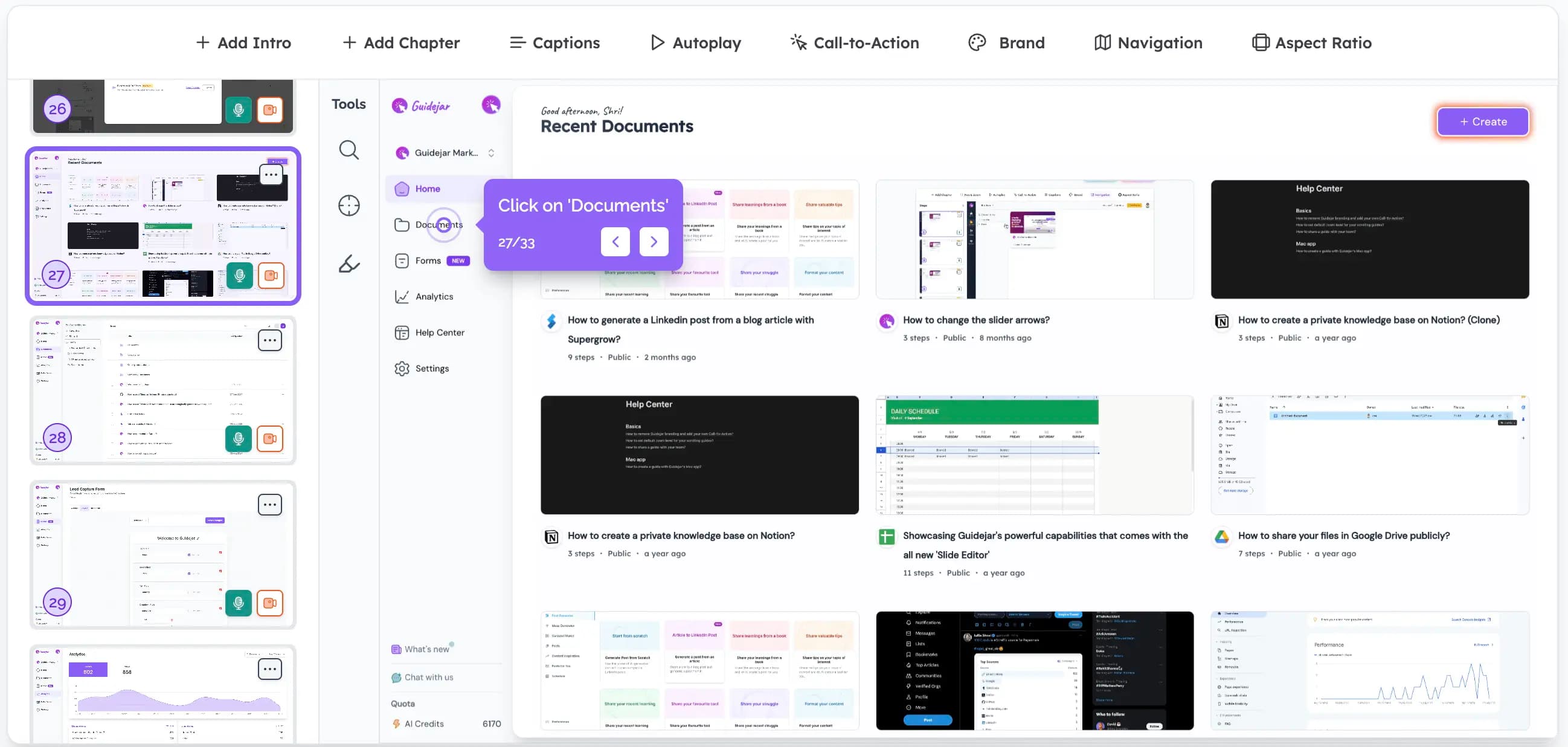
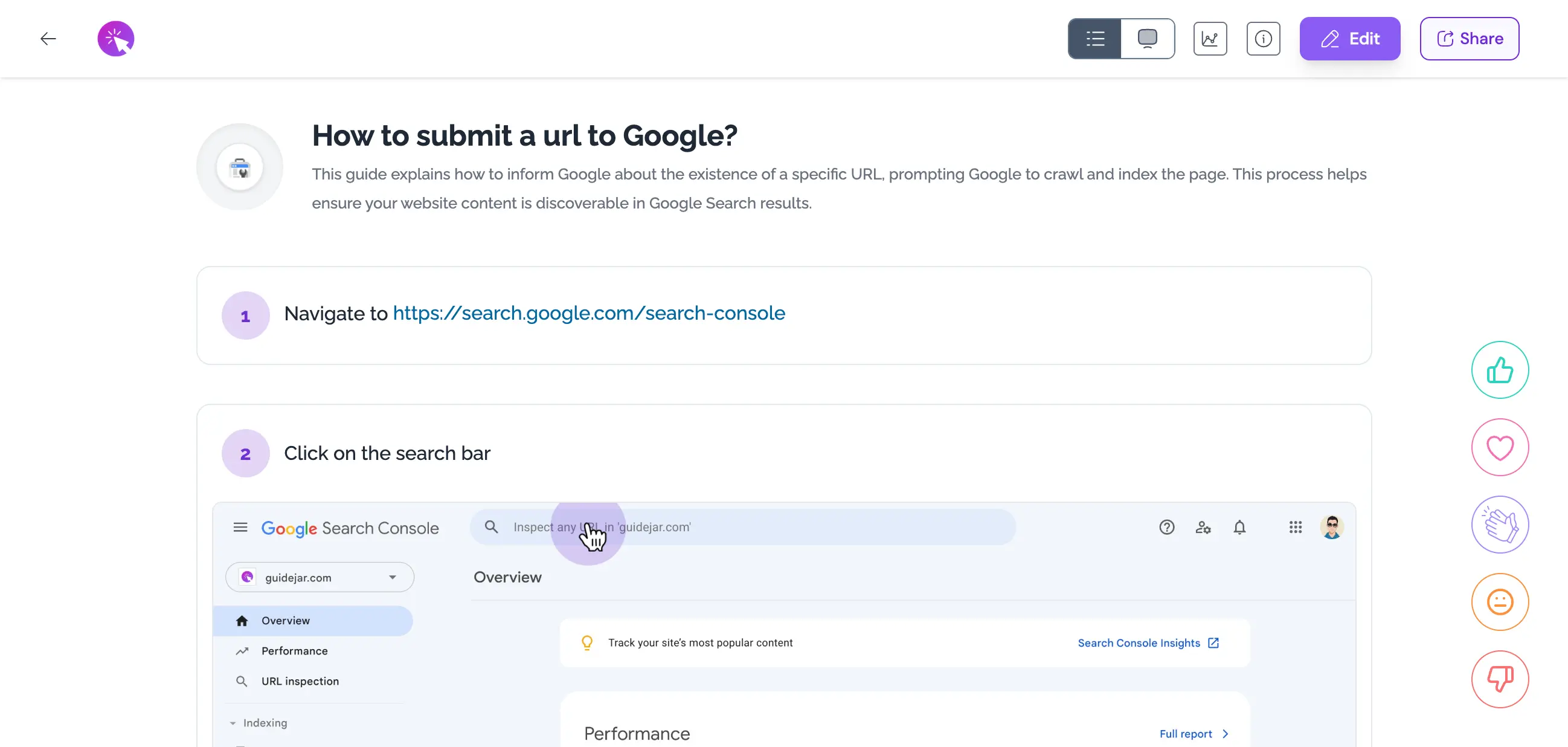
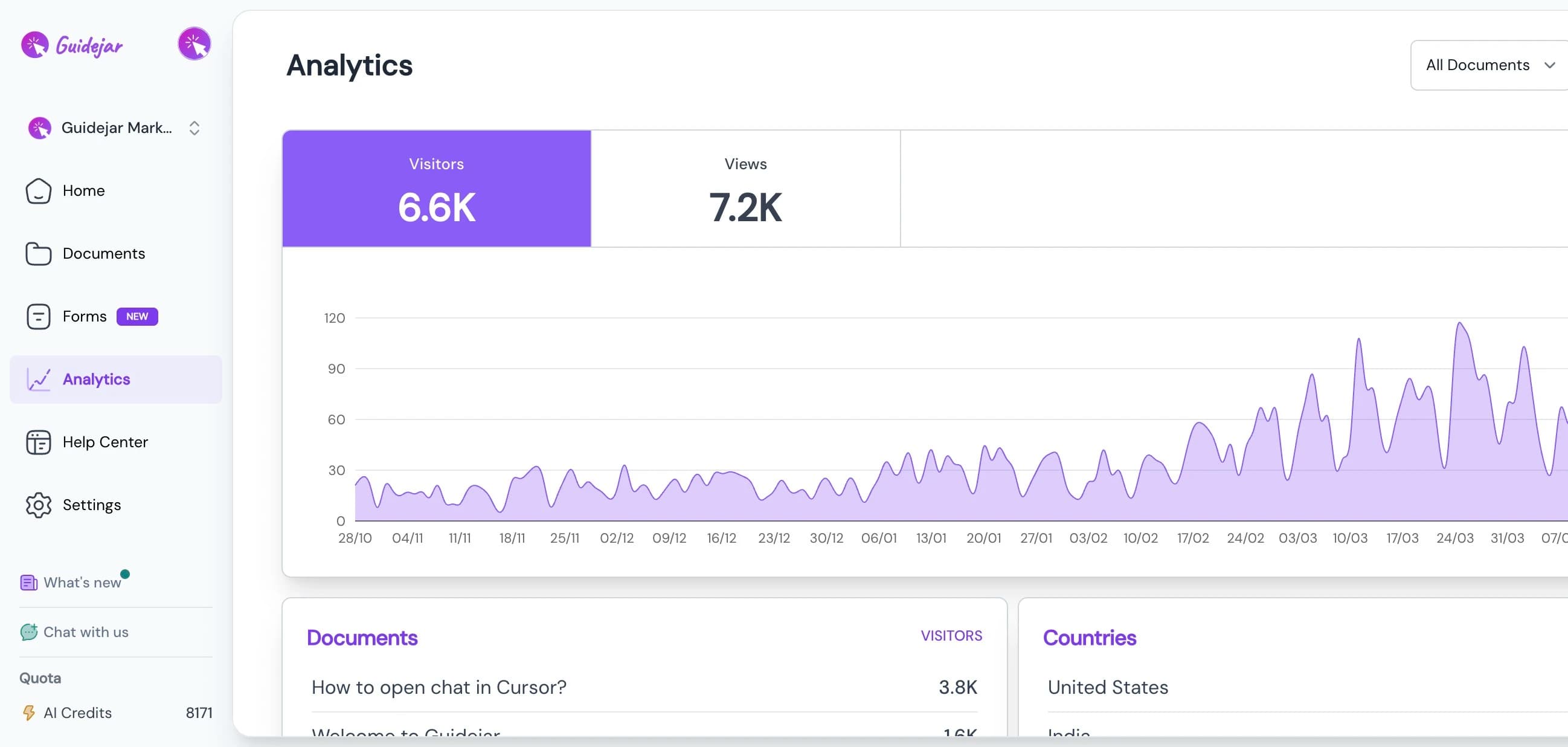
Guidejar vs Tango in 30 seconds
Tango (now on tango.ai, long marketed on tango.us) turns a browser or desktop workflow into a polished, auto-annotated step-by-step guide, and it has pushed hard into digital adoption. Its Guide Me walkthroughs overlay steps right on top of live apps like Salesforce and Workday, which is a real strength worth taking seriously.
The catch in 2026 is where Tango’s best pieces live. Branching, translation, SSO, and automatic PII redaction are all Enterprise-only, on custom pricing you have to negotiate. Its "video" is an auto-updating embed, not a file you can download, and there is no AI voiceover, only speech-to-text captions. There is no hosted, customer-facing help center at any tier.
Guidejar captures the same SOPs and ships those capabilities on $19–$75 plans you can buy with a card: MP4 export with a chosen or cloned voice, translation into 30+ languages from Pro, branching from Pro, and a branded help center on your own domain. The full feature table and the pricing math are below, and where Tango is genuinely the better pick, we say so.
Four reasons SOP teams pick Guidejar over Tango
Both tools turn a captured workflow into a step-by-step guide. Guidejar gives you more ways to publish it, and doesn’t park branching or translation behind an Enterprise contract.
Output breadth
A downloadable MP4 with a voice you choose
The same capture publishes as a written SOP, an interactive walkthrough, or a downloadable MP4 with an AI voiceover you pick, and can clone from your own voice on Business. Tango’s video is an auto-updating embed you link or embed, not a file you can download, and it has no AI voiceover at all. Its Voice Transcription just turns what you say into step text, not narration.
How AI voiceover worksTranslation
Translate one capture into 30+ languages
A global SOP or training team shouldn’t need an Enterprise contract to ship a French or Japanese guide. One Guidejar capture translates into every language your audience needs on any paid plan, starting at $19 a seat. Tango translates into 10 languages, but only for Enterprise customers on custom pricing, so a self-serve Pro team can’t translate at all.
See AI translationWhat each plan unlocks
Branching, SSO and translation without an Enterprise call
Tango and Guidejar cost about the same per seat, so the real difference is what each plan includes. At Tango, branching, translation, SSO, SCIM, and automatic PII redaction all live behind an Enterprise contract you have to negotiate. Guidejar ships branching from Pro and the rest across its $19–$75 plans, which means a team that needs those things pays Tango far more to get them.
See Guidejar pricingHelp center
Publish SOPs where people can actually find them
A searchable, branded help center at help.yourcompany.com turns one-off SOPs into a knowledge base your team and your customers can reach, with Ask AI to deflect repeat questions on Business. Tango shares guides by link or embed and brands your internal library, but it has no hosted, customer-facing help center on a domain of your own at any tier.
Explore the help center
Feature-by-feature comparison
Side by side on the SOP job: capture, written output, AI, exports, publishing, and price. In-app guidance sits in the publishing rows, where Tango is strong.
| Capability | Guidejar | Tango |
|---|---|---|
| Capture | ||
| Browser capture | Yes — free plan | Yes — free plan |
| Desktop capture | Plus plan | Pro plan |
| Manual blur & redaction | Yes — free plan | Pro plan |
| Automatic PII redaction | Auto-Redact PII (Business) | Secure Blur, Enterprise only |
| Content & output | ||
| Written step-by-step output | Included | Included |
| Configurable AI voiceover | Yes — Pro plan | No — speech-to-text captions only |
| AI voice cloning | Business plan | Not available |
| Multi-language translation | Into 30+ languages, Pro plan | Into 10, Enterprise only |
| Downloadable video / MP4 export | Plus plan | No — auto-updating embed, not a file |
| Interactive branching | Yes — Pro plan | Enterprise only |
| Interactive walkthrough delivery | Walkthrough View, all paid plans | Guide Me, all plans |
| Chapters | Yes — Pro plan | Not available |
| Import from PDF / DOCX | Pro plan | No — live capture only |
| Exports | ||
| PDF export | Yes — free plan | Pro plan |
| HTML export | Pro plan | Pro plan |
| Markdown export | Pro plan | Pro plan |
| Paste into Confluence / Notion | Insta Copy paste | Rich paste / embed |
| Publishing & AI | ||
| Hosted branded help center | Plus plan | No — link & embed sharing |
| Custom domain | Plus plan | Not available |
| In-app guidance overlay | Help Center Widget popover (Plus) | Guide Me all plans, Pins Enterprise |
| Help center AI answers | Ask AI (Business) | Not available |
| MCP server (AI integration) | Build & query your library with AI (Plus) | Not available |
| SAML SSO | Business and Enterprise plans | Enterprise only |
| Pricing | ||
| Free plan | 5 guides, watermarked | 5 workflows, no export |
| Starting paid price (monthly) | $19/seat — Pro | $20/seat — Pro Team (3+) |
| Starting paid price (billed yearly) | $16/seat — Pro | $15/seat — Pro Team (3+) |
| Small team, 1–2 users (monthly) | $19/seat, any team size | $26/seat — Pro Personal |
| Enterprise | Custom | Custom |
On the everyday capture job, browser capture and written SOP output are a tie, and Tango wins on in-app guidance and automatic redaction. The value gap is what tier things live on. Branching, translation, SSO, and automatic PII redaction are all Enterprise-only at Tango, on custom pricing you have to negotiate. Guidejar ships branching from Pro and the rest across $19–$75 plans you can buy with a card, and adds what Tango doesn’t have at any tier: a downloadable MP4 with a chosen or cloned voice, and a branded help center on your own domain.
Verified against Tango’s public pricing and documentation, July 2026. Spot something out of date? Tell us and we’ll correct it.
Pricing compared
Per seat the two are a wash. The gap is what you have to pay to unlock the good parts.
$600less/year
a 10-person team on Guidejar Business vs Tango Pro Team, both billed monthly, with more unlocked
30+languages
Guidejar translates from Pro; Tango’s 10 languages are Enterprise-only
Enterpriseat Tango
where branching, SSO, and automatic redaction live; Guidejar ships them from $19–$75
Bottom line: Per seat, Tango Pro and Guidejar Pro cost about the same, so raw price isn’t the story. What is: a 10-person team on Tango Pro Team pays $200/month billed monthly and still can’t translate, branch, or turn on SSO without an Enterprise deal. The same team on Guidejar Business pays $150/month with all of that plus a branded help center and voice cloning included. That’s $600 less a year. Billed annually it’s $119 vs $150 a month.
Prices as of July 2026. Tango Pro Team pricing needs 3+ seats; 1–2 users pay the $26/$22 Personal rate. Guidejar Business bundles 5 seats. See full Guidejar pricing →
Where Tango genuinely wins
No tool is best at everything. Here’s where Tango is the more sensible pick.
Real in-app guidance, not just a launcher
This is Tango’s standout. Guide Me overlays a live, step-by-step walkthrough directly on top of the app someone is using, on every plan including Free, and Enterprise adds Pins, Nuggets, and Automations that anchor persistent tips inside Salesforce, Workday, or HubSpot. It competes in real WalkMe and Whatfix territory. Guidejar’s Help Center Widget is a popover launcher that surfaces your guides inside a web app, which is close and useful, but it is not the same as an overlay guiding you through the live screen. If in-app adoption is the job, Tango is stronger here.
Automatic PII redaction that runs by policy
Tango’s Secure Blur automatically detects and blurs sensitive data as you capture, so redaction happens by policy rather than by whoever is recording. It is an Enterprise feature, but it is genuine automatic detection. Guidejar’s Auto-Redact PII arrives on Business and its lower plans redact manually. For a healthcare, finance, or legal team that needs redaction applied automatically across every capture, Tango has the edge.
Enterprise governance and app-overlay breadth
For a large IT or enablement org, Tango’s deployment story is deep: SSO, SCIM provisioning, central extension rollout through Active Directory or Google Identity, 365-day version history, and audit logs, under SOC 2. Its extension also works on top of heavyweight systems like Salesforce, Oracle, SAP, Workday, and ServiceNow with no connector setup. Tango is rated around 4.7 on G2 with roughly 500 reviews as of mid-2026, so the ease-of-use reputation is well earned. If you’re buying this as a digital-adoption platform for enterprise systems, Tango fits that shape better than Guidejar.
Which tool is right for your team?
Honest recommendations based on how your team documents and delivers processes.
Choose Guidejar if
- You want the same fast SOP capture without paying Tango’s Enterprise gate for branching, translation, or SSO
- You need a downloadable MP4 with an AI voiceover you pick, or clone from your own voice
- You need to translate guides into 30+ languages starting on the Pro plan
- You want SOPs published on a branded help center at your own domain that customers can reach
- You care about free-plan PDF export and imports from PDFs and Word docs
- You’d rather buy branching, SSO, and redaction with a card than negotiate an Enterprise contract
- You want an AI agent to build your SOP library from existing docs, and the team to self-serve answers from ChatGPT or Claude — Tango has no MCP server
Choose Tango if
- Your main job is live in-app guidance, overlaying walkthroughs on top of Salesforce, Workday, or ServiceNow
- You need automatic PII redaction applied by policy on every capture
- You’re rolling out to a large org that needs SSO, SCIM, and central extension deployment
- You see this as a digital-adoption platform purchase rather than a guide-maker, and the Enterprise budget is there
Most teams should pick Guidejar.
It does the same fast SOP capture Tango is known for, then adds what Tango gates or lacks: a downloadable MP4 with a chosen or cloned voice, translation into 30+ languages from Pro, branching from Pro, and a branded help center on your own domain, all on plans you buy with a card. Choose Tango when live in-app guidance across enterprise systems, automatic redaction by policy, or SSO and central deployment are hard requirements and the Enterprise budget is there.
Switching from Tango to Guidejar
You don’t have to start over. Most teams finish the move in a few days.
- 1
Export what you have
Tango exports guides to PDF, HTML, and Markdown on Pro. The Free plan can’t export at all and caps you at 5 shared workflows, so anything there needs re-capturing. Guide Me flows and Pins are Tango-proprietary and don’t travel.
- 2
Import into Guidejar
Turn those PDFs or Markdown docs into guides in a few clicks, with no all-time import cap, and bring existing screenshots straight in. Anything else re-captures with our browser extension or desktop app in a couple of minutes.
- 3
Publish it properly
Choose Scroll View or Walkthrough View or both per guide, add an AI voiceover, translate into 30+ languages, and put the whole library on a branded help center at your own domain.
Trusted by teams worldwide










“Instead of spending an hour going back and forth on Slack, I record a quick guide and boom: headache and stress-inducing training session averted.”
Kevin Raposo, Founder of KnowTechie
Frequently asked questions
The questions people actually search before picking one of the two.
Something else on your mind? Talk to us
For most teams documenting processes, yes. Guidejar captures the same SOPs at a similar per-seat price, then adds a downloadable MP4 with an AI voiceover, translation into 30+ languages from Pro, branching from Pro, and a branded help center, none of which Tango offers on a self-serve plan. Tango is the stronger pick when your real job is live in-app guidance across enterprise apps, or automatic redaction by policy.
Tango has a free plan, but it caps you at 5 shared workflows across the whole workspace, with no export, no desktop capture, and everything you share carries Tango branding. Real work stalls at 5 guides. Guidejar’s free plan is 5 guides for 1 user with browser capture, PDF export, sharing, embedding, and manual blurring, with a Guidejar watermark until you upgrade.
No. Tango’s only voice feature is Voice Transcription on Pro, which turns what you say into step text, not spoken narration. There is no AI voiceover anywhere in its plans or changelog. Guidejar lets you pick a voice and generate narration for any guide on Pro, and clone your own voice on Business.
Not as a file. Tango’s Video Embeds on Pro and up are an auto-updating watchable embed you share by link or drop into a page, not a downloadable MP4. Guidejar exports a real MP4 file, with an AI voiceover baked in, on its Plus and Business plans.
Browser capture works on every Tango plan including Free, but desktop capture requires Pro or higher. Guidejar is the same shape: browser capture on the free plan, desktop capture on Plus.
Both are Enterprise-only. Tango translates workflows into 10 languages and offers SSO with SCIM, but only on its custom-priced Enterprise plan, so a self-serve Pro team gets neither. Guidejar translates into 30+ languages from Pro at $19 a seat, and includes SAML SSO for the help center on Business.
Manual blur while capturing is on Pro, but automatic PII detection, which Tango calls Secure Blur, is Enterprise-only. This is a genuine Tango strength for regulated teams. Guidejar offers manual redaction on its lower plans and automatic Auto-Redact PII on Business.
Usually, yes, though check your plan first. Tango exports to PDF, HTML, and Markdown on Pro, but the Free plan can’t export at all, so those guides need re-capturing. Guidejar imports PDFs and Word docs on Pro with no all-time cap, and you can bring in existing screenshots too. Most teams finish the move in a few days.